Friday, December 16, 2011

Saturday, December 10, 2011
Apple - iOS 5 - See new features included in iOS 5.


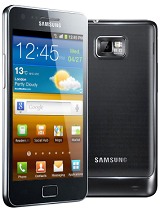
Samsung I9100 Galaxy S II-specifications
Tuesday, November 29, 2011
What is Android?
Android is a software stack for mobile devices that includes an operating system, middleware and key applications. The Android SDK provides the tools and APIs necessary to begin developing applications on the Android platform using the Java programming language.
Features
Application framework enabling reuse and replacement of components
Dalvik virtual machine optimized for mobile devices
Integrated browser based on the open source WebKit engine
Optimized graphics powered by a custom 2D graphics library; 3D graphics based on the OpenGL ES 1.0 specification (hardware acceleration optional)
SQLite for structured data storage
Media support for common audio, video, and still image formats (MPEG4, H.264, MP3, AAC, AMR, JPG, PNG, GIF)
GSM Telephony (hardware dependent)
Bluetooth, EDGE, 3G, and WiFi (hardware dependent)
Camera, GPS, compass, and accelerometer (hardware dependent)
Rich development environment including a device emulator, tools for debugging, memory and performance profiling, and a plugin for the Eclipse IDE
Android Architecture
The following diagram shows the major components of the Android operating system. Each section is described in more detail below.
 Applications
Android will ship with a set of core applications including an email client, SMS program, calendar, maps, browser, contacts, and others. All applications are written using the Java programming language.
Application Framework
By providing an open development platform, Android offers developers the ability to build extremely rich and innovative applications. Developers are free to take advantage of the device hardware, access location information, run background services, set alarms, add notifications to the status bar, and much, much more.
Developers have full access to the same framework APIs used by the core applications. The application architecture is designed to simplify the reuse of components; any application can publish its capabilities and any other application may then make use of those capabilities (subject to security constraints enforced by the framework). This same mechanism allows components to be replaced by the user.
Underlying all applications is a set of services and systems, including:
A rich and extensible set of Views that can be used to build an application, including lists, grids, text boxes, buttons, and even an embeddable web browser
Content Providers that enable applications to access data from other applications (such as Contacts), or to share their own data
A Resource Manager, providing access to non-code resources such as localized strings, graphics, and layout files
A Notification Manager that enables all applications to display custom alerts in the status bar
An Activity Manager that manages the lifecycle of applications and provides a common navigation backstack
For more details and a walkthrough of an application, see the Notepad Tutorial.
Libraries
Android includes a set of C/C++ libraries used by various components of the Android system. These capabilities are exposed to developers through the Android application framework. Some of the core libraries are listed below:
System C library - a BSD-derived implementation of the standard C system library (libc), tuned for embedded Linux-based devices
Media Libraries - based on PacketVideo's OpenCORE; the libraries support playback and recording of many popular audio and video formats, as well as static image files, including MPEG4, H.264, MP3, AAC, AMR, JPG, and PNG
Surface Manager - manages access to the display subsystem and seamlessly composites 2D and 3D graphic layers from multiple applications
LibWebCore - a modern web browser engine which powers both the Android browser and an embeddable web view
SGL - the underlying 2D graphics engine
3D libraries - an implementation based on OpenGL ES 1.0 APIs; the libraries use either hardware 3D acceleration (where available) or the included, highly optimized 3D software rasterizer
FreeType - bitmap and vector font rendering
SQLite - a powerful and lightweight relational database engine available to all applications
Android Runtime
Android includes a set of core libraries that provides most of the functionality available in the core libraries of the Java programming language.
Every Android application runs in its own process, with its own instance of the Dalvik virtual machine. Dalvik has been written so that a device can run multiple VMs efficiently. The Dalvik VM executes files in the Dalvik Executable (.dex) format which is optimized for minimal memory footprint. The VM is register-based, and runs classes compiled by a Java language compiler that have been transformed into the .dex format by the included "dx" tool.
The Dalvik VM relies on the Linux kernel for underlying functionality such as threading and low-level memory management.
Linux Kernel
Android relies on Linux version 2.6 for core system services such as security, memory management, process management, network stack, and driver model. The kernel also acts as an abstraction layer between the hardware and the rest of the software stack.
Applications
Android will ship with a set of core applications including an email client, SMS program, calendar, maps, browser, contacts, and others. All applications are written using the Java programming language.
Application Framework
By providing an open development platform, Android offers developers the ability to build extremely rich and innovative applications. Developers are free to take advantage of the device hardware, access location information, run background services, set alarms, add notifications to the status bar, and much, much more.
Developers have full access to the same framework APIs used by the core applications. The application architecture is designed to simplify the reuse of components; any application can publish its capabilities and any other application may then make use of those capabilities (subject to security constraints enforced by the framework). This same mechanism allows components to be replaced by the user.
Underlying all applications is a set of services and systems, including:
A rich and extensible set of Views that can be used to build an application, including lists, grids, text boxes, buttons, and even an embeddable web browser
Content Providers that enable applications to access data from other applications (such as Contacts), or to share their own data
A Resource Manager, providing access to non-code resources such as localized strings, graphics, and layout files
A Notification Manager that enables all applications to display custom alerts in the status bar
An Activity Manager that manages the lifecycle of applications and provides a common navigation backstack
For more details and a walkthrough of an application, see the Notepad Tutorial.
Libraries
Android includes a set of C/C++ libraries used by various components of the Android system. These capabilities are exposed to developers through the Android application framework. Some of the core libraries are listed below:
System C library - a BSD-derived implementation of the standard C system library (libc), tuned for embedded Linux-based devices
Media Libraries - based on PacketVideo's OpenCORE; the libraries support playback and recording of many popular audio and video formats, as well as static image files, including MPEG4, H.264, MP3, AAC, AMR, JPG, and PNG
Surface Manager - manages access to the display subsystem and seamlessly composites 2D and 3D graphic layers from multiple applications
LibWebCore - a modern web browser engine which powers both the Android browser and an embeddable web view
SGL - the underlying 2D graphics engine
3D libraries - an implementation based on OpenGL ES 1.0 APIs; the libraries use either hardware 3D acceleration (where available) or the included, highly optimized 3D software rasterizer
FreeType - bitmap and vector font rendering
SQLite - a powerful and lightweight relational database engine available to all applications
Android Runtime
Android includes a set of core libraries that provides most of the functionality available in the core libraries of the Java programming language.
Every Android application runs in its own process, with its own instance of the Dalvik virtual machine. Dalvik has been written so that a device can run multiple VMs efficiently. The Dalvik VM executes files in the Dalvik Executable (.dex) format which is optimized for minimal memory footprint. The VM is register-based, and runs classes compiled by a Java language compiler that have been transformed into the .dex format by the included "dx" tool.
The Dalvik VM relies on the Linux kernel for underlying functionality such as threading and low-level memory management.
Linux Kernel
Android relies on Linux version 2.6 for core system services such as security, memory management, process management, network stack, and driver model. The kernel also acts as an abstraction layer between the hardware and the rest of the software stack.

Subscribe to:
Posts (Atom)